> ## Documentation Index
> Fetch the complete documentation index at: https://docs-staging-feat-anonymous-sessions.mintlify.site/llms.txt
> Use this file to discover all available pages before exploring further.

> Describes how to use Flows with Forms.

# Flows

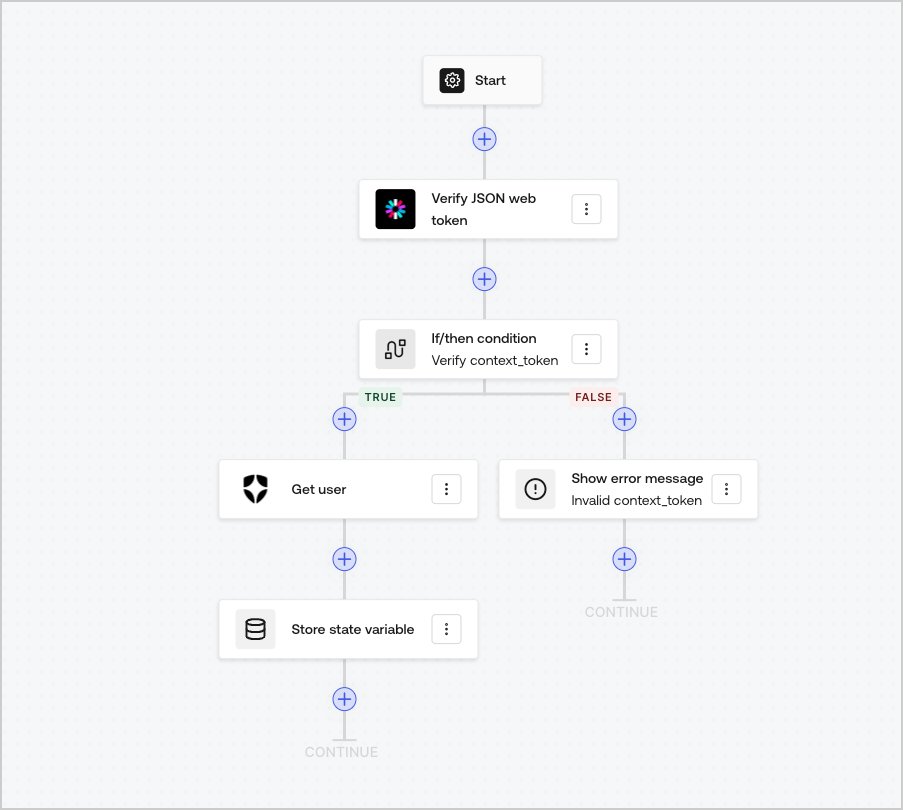
Flows allow you to visually build the server-side logic that can be executed within your Forms and handle the collected information, integrate any service with an API or trigger automations.
<Frame>
  <img src="https://mintcdn.com/docs-staging-feat-anonymous-sessions/kmiy4CAOofKoyML9/docs/images/cdy7uua7fh8z/6u6Huh5CbH3GEQJv3AH7cx/e49ea613b2c46a43c83c89ffecddbafe/Flows.png?fit=max&auto=format&n=kmiy4CAOofKoyML9&q=85&s=e31abebacbdb84ad28654e5491e496c1" alt="Dashboard > Forms > Flows" data-og-width="903" width="903" data-og-height="810" height="810" data-path="docs/images/cdy7uua7fh8z/6u6Huh5CbH3GEQJv3AH7cx/e49ea613b2c46a43c83c89ffecddbafe/Flows.png" data-optimize="true" data-opv="3" srcset="https://mintcdn.com/docs-staging-feat-anonymous-sessions/kmiy4CAOofKoyML9/docs/images/cdy7uua7fh8z/6u6Huh5CbH3GEQJv3AH7cx/e49ea613b2c46a43c83c89ffecddbafe/Flows.png?w=280&fit=max&auto=format&n=kmiy4CAOofKoyML9&q=85&s=96a95756d745bbad207aa808399a090c 280w, https://mintcdn.com/docs-staging-feat-anonymous-sessions/kmiy4CAOofKoyML9/docs/images/cdy7uua7fh8z/6u6Huh5CbH3GEQJv3AH7cx/e49ea613b2c46a43c83c89ffecddbafe/Flows.png?w=560&fit=max&auto=format&n=kmiy4CAOofKoyML9&q=85&s=3d7ee63ea5d5744b0d40cbc9667afaf7 560w, https://mintcdn.com/docs-staging-feat-anonymous-sessions/kmiy4CAOofKoyML9/docs/images/cdy7uua7fh8z/6u6Huh5CbH3GEQJv3AH7cx/e49ea613b2c46a43c83c89ffecddbafe/Flows.png?w=840&fit=max&auto=format&n=kmiy4CAOofKoyML9&q=85&s=a2c1fccee0acd456aa13ba0a3c7ecd0a 840w, https://mintcdn.com/docs-staging-feat-anonymous-sessions/kmiy4CAOofKoyML9/docs/images/cdy7uua7fh8z/6u6Huh5CbH3GEQJv3AH7cx/e49ea613b2c46a43c83c89ffecddbafe/Flows.png?w=1100&fit=max&auto=format&n=kmiy4CAOofKoyML9&q=85&s=228c8e61ec0a1800476c9afa89d26583 1100w, https://mintcdn.com/docs-staging-feat-anonymous-sessions/kmiy4CAOofKoyML9/docs/images/cdy7uua7fh8z/6u6Huh5CbH3GEQJv3AH7cx/e49ea613b2c46a43c83c89ffecddbafe/Flows.png?w=1650&fit=max&auto=format&n=kmiy4CAOofKoyML9&q=85&s=04c0074f2802d2793be20067e71fa6a0 1650w, https://mintcdn.com/docs-staging-feat-anonymous-sessions/kmiy4CAOofKoyML9/docs/images/cdy7uua7fh8z/6u6Huh5CbH3GEQJv3AH7cx/e49ea613b2c46a43c83c89ffecddbafe/Flows.png?w=2500&fit=max&auto=format&n=kmiy4CAOofKoyML9&q=85&s=7c07ef773d866b3c025193c99ffefbe6 2500w" />
</Frame>

You can use Flows actions with your form to:

* Create custom server-side validations for your form steps.
* Integrate with your own API making custom HTTP requests.
* Integrate with 3rd parties using our out-of-the-box integrations.
* Execute different business logic based based on user input or properties.
* Validate data using <Tooltip tip="JSON Web Token (JWT): Standard ID Token format (and often Access Token format) used to represent claims securely between two parties." cta="View Glossary" href="/docs/glossary?term=JSON+Web+Tokens">JSON Web Tokens</Tooltip>.
