> ## Documentation Index
> Fetch the complete documentation index at: https://docs-staging-feat-anonymous-sessions.mintlify.site/llms.txt
> Use this file to discover all available pages before exploring further.

> Configure an update policy form using Forms for Actions

# Use Cases: Configure an update policy form using Forms

<Card title="Before you start">
  1. Create a [Machine-to-Machine Application](/docs/get-started/auth0-overview/create-applications/machine-to-machine-apps) with the following scopes enabled:

  * `read:users`
  * `update:users`
  * `create:users`
  * `read:users_app_metadata`
  * `update:users_app_metadata`
  * `create:users_app_metadata`

  2. Add a [Vault connection](/docs/customize/forms/vault) using the M2M application credentials.
</Card>

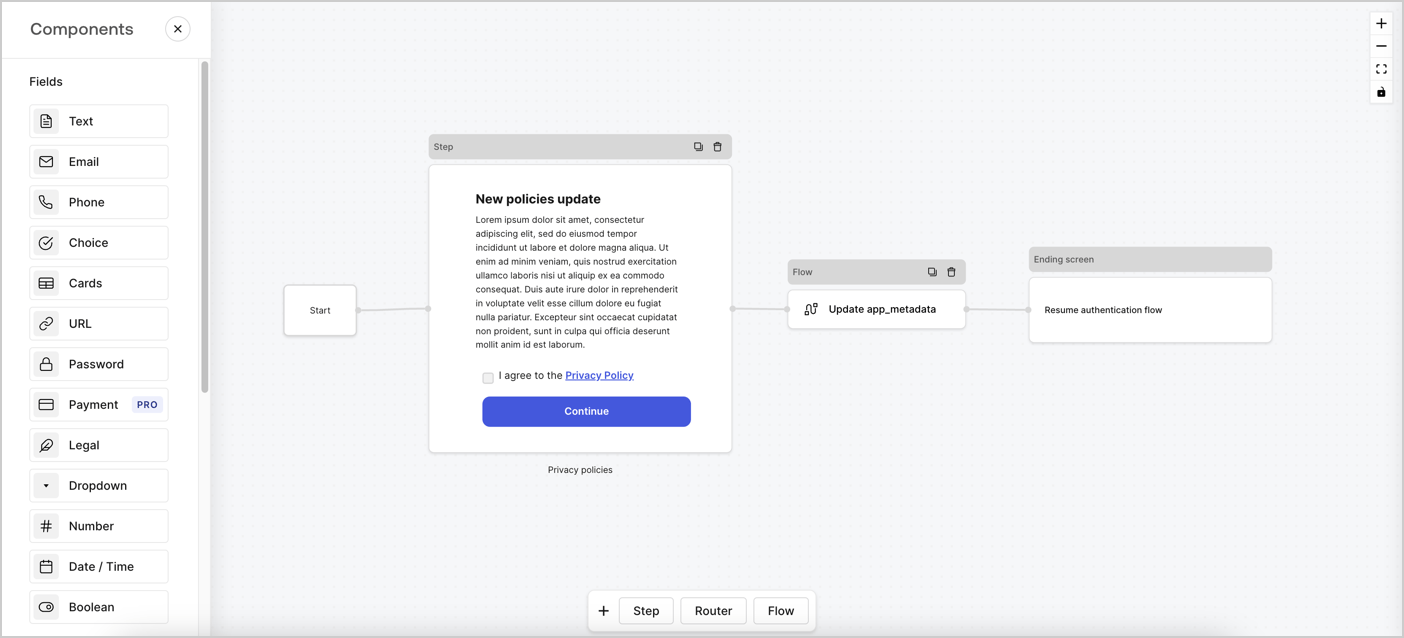
Forms for Actions allows you to create custom privacy policies flows and store the consent under the `app_metadata` object.
<Frame>
  <img src="https://mintcdn.com/docs-staging-feat-anonymous-sessions/kmiy4CAOofKoyML9/docs/images/cdy7uua7fh8z/6i68dMvHDTijfRmSgN1x8Q/ad900e7d4c0fb34645921435472b8684/privavy-policy-form.png?fit=max&auto=format&n=kmiy4CAOofKoyML9&q=85&s=1873eb1094019ea3ec657c4ed170ba59" alt="Dashboard > Actions > Forms > Privacy policy use case" data-og-width="1404" width="1404" data-og-height="638" height="638" data-path="docs/images/cdy7uua7fh8z/6i68dMvHDTijfRmSgN1x8Q/ad900e7d4c0fb34645921435472b8684/privavy-policy-form.png" data-optimize="true" data-opv="3" srcset="https://mintcdn.com/docs-staging-feat-anonymous-sessions/kmiy4CAOofKoyML9/docs/images/cdy7uua7fh8z/6i68dMvHDTijfRmSgN1x8Q/ad900e7d4c0fb34645921435472b8684/privavy-policy-form.png?w=280&fit=max&auto=format&n=kmiy4CAOofKoyML9&q=85&s=e9b859d144ee196de76e79a166fb86e5 280w, https://mintcdn.com/docs-staging-feat-anonymous-sessions/kmiy4CAOofKoyML9/docs/images/cdy7uua7fh8z/6i68dMvHDTijfRmSgN1x8Q/ad900e7d4c0fb34645921435472b8684/privavy-policy-form.png?w=560&fit=max&auto=format&n=kmiy4CAOofKoyML9&q=85&s=ca577d77fc6a3f27d8866746cd37863d 560w, https://mintcdn.com/docs-staging-feat-anonymous-sessions/kmiy4CAOofKoyML9/docs/images/cdy7uua7fh8z/6i68dMvHDTijfRmSgN1x8Q/ad900e7d4c0fb34645921435472b8684/privavy-policy-form.png?w=840&fit=max&auto=format&n=kmiy4CAOofKoyML9&q=85&s=99504a8f4ca4afd1217ab07cbba324bd 840w, https://mintcdn.com/docs-staging-feat-anonymous-sessions/kmiy4CAOofKoyML9/docs/images/cdy7uua7fh8z/6i68dMvHDTijfRmSgN1x8Q/ad900e7d4c0fb34645921435472b8684/privavy-policy-form.png?w=1100&fit=max&auto=format&n=kmiy4CAOofKoyML9&q=85&s=6b116463df4d81e0530164ea51d66731 1100w, https://mintcdn.com/docs-staging-feat-anonymous-sessions/kmiy4CAOofKoyML9/docs/images/cdy7uua7fh8z/6i68dMvHDTijfRmSgN1x8Q/ad900e7d4c0fb34645921435472b8684/privavy-policy-form.png?w=1650&fit=max&auto=format&n=kmiy4CAOofKoyML9&q=85&s=b2797577a7e151b37927df6721c731b5 1650w, https://mintcdn.com/docs-staging-feat-anonymous-sessions/kmiy4CAOofKoyML9/docs/images/cdy7uua7fh8z/6i68dMvHDTijfRmSgN1x8Q/ad900e7d4c0fb34645921435472b8684/privavy-policy-form.png?w=2500&fit=max&auto=format&n=kmiy4CAOofKoyML9&q=85&s=2acfc7057960e0d3ea0c5ad25a871742 2500w" />
</Frame>

The sections below outline how you can create an Update Policy form using nodes and flows, along with steps for adding your form to a [Post Login](/docs/customize/actions/explore-triggers/signup-and-login-triggers/login-trigger) Action.

## Create a form from scratch

Follow these steps to create a form to gather information:

1. Open the Form editor by selecting **Auth0 Dashboard > Actions > Forms.**
2. Select **Create Form** > **Start from scratch**.

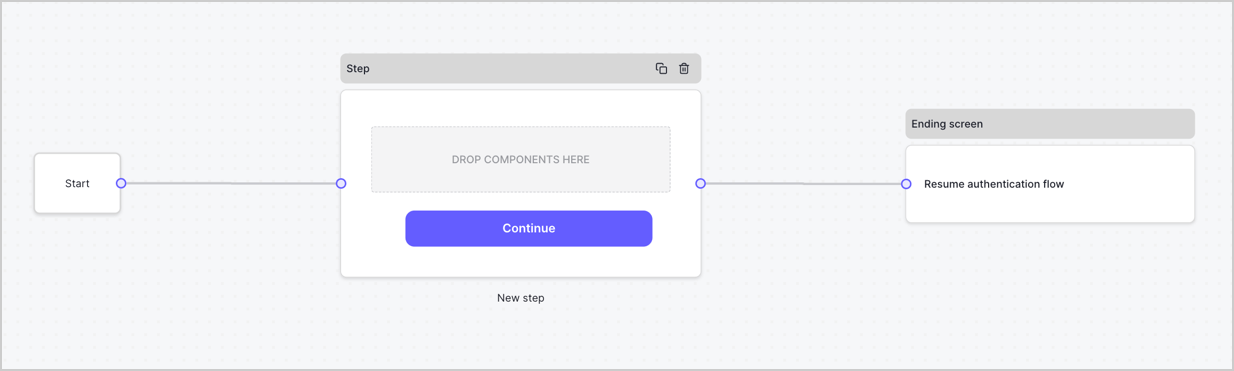
By default, a new form contains a Start node, a Step node, and an Ending screen node.
<Frame>
  <img src="https://mintcdn.com/docs-staging-feat-anonymous-sessions/BNAQf6Y94ryDJ87o/docs/images/cdy7uua7fh8z/2TZ9jSjgEcARFpULI6hz4R/a4319a1bd482f2ee5cc23100fdb2f42c/New-form-Forms-for-action-use-case.png?fit=max&auto=format&n=BNAQf6Y94ryDJ87o&q=85&s=3b933368bbdf9c1a50088a97ad8a38f7" alt="Dashboard > Forms > Use Cases > Form" data-og-width="1234" width="1234" data-og-height="371" height="371" data-path="docs/images/cdy7uua7fh8z/2TZ9jSjgEcARFpULI6hz4R/a4319a1bd482f2ee5cc23100fdb2f42c/New-form-Forms-for-action-use-case.png" data-optimize="true" data-opv="3" srcset="https://mintcdn.com/docs-staging-feat-anonymous-sessions/BNAQf6Y94ryDJ87o/docs/images/cdy7uua7fh8z/2TZ9jSjgEcARFpULI6hz4R/a4319a1bd482f2ee5cc23100fdb2f42c/New-form-Forms-for-action-use-case.png?w=280&fit=max&auto=format&n=BNAQf6Y94ryDJ87o&q=85&s=3a81869a3e45262b5ccf2c6e6e3836ba 280w, https://mintcdn.com/docs-staging-feat-anonymous-sessions/BNAQf6Y94ryDJ87o/docs/images/cdy7uua7fh8z/2TZ9jSjgEcARFpULI6hz4R/a4319a1bd482f2ee5cc23100fdb2f42c/New-form-Forms-for-action-use-case.png?w=560&fit=max&auto=format&n=BNAQf6Y94ryDJ87o&q=85&s=cdda9889c6f620c4d2f29d84b7545ef3 560w, https://mintcdn.com/docs-staging-feat-anonymous-sessions/BNAQf6Y94ryDJ87o/docs/images/cdy7uua7fh8z/2TZ9jSjgEcARFpULI6hz4R/a4319a1bd482f2ee5cc23100fdb2f42c/New-form-Forms-for-action-use-case.png?w=840&fit=max&auto=format&n=BNAQf6Y94ryDJ87o&q=85&s=4c1c289d0d4252ed1e120d1ddc89242e 840w, https://mintcdn.com/docs-staging-feat-anonymous-sessions/BNAQf6Y94ryDJ87o/docs/images/cdy7uua7fh8z/2TZ9jSjgEcARFpULI6hz4R/a4319a1bd482f2ee5cc23100fdb2f42c/New-form-Forms-for-action-use-case.png?w=1100&fit=max&auto=format&n=BNAQf6Y94ryDJ87o&q=85&s=44b148e990230ecebd74427fe4d0fed4 1100w, https://mintcdn.com/docs-staging-feat-anonymous-sessions/BNAQf6Y94ryDJ87o/docs/images/cdy7uua7fh8z/2TZ9jSjgEcARFpULI6hz4R/a4319a1bd482f2ee5cc23100fdb2f42c/New-form-Forms-for-action-use-case.png?w=1650&fit=max&auto=format&n=BNAQf6Y94ryDJ87o&q=85&s=f9d0c3fd05f6e2c7e46bc153d0340eab 1650w, https://mintcdn.com/docs-staging-feat-anonymous-sessions/BNAQf6Y94ryDJ87o/docs/images/cdy7uua7fh8z/2TZ9jSjgEcARFpULI6hz4R/a4319a1bd482f2ee5cc23100fdb2f42c/New-form-Forms-for-action-use-case.png?w=2500&fit=max&auto=format&n=BNAQf6Y94ryDJ87o&q=85&s=dc98e30e4a967cabac48f1bc4bbd0ba3 2500w" />
</Frame>

### Configure the Step node

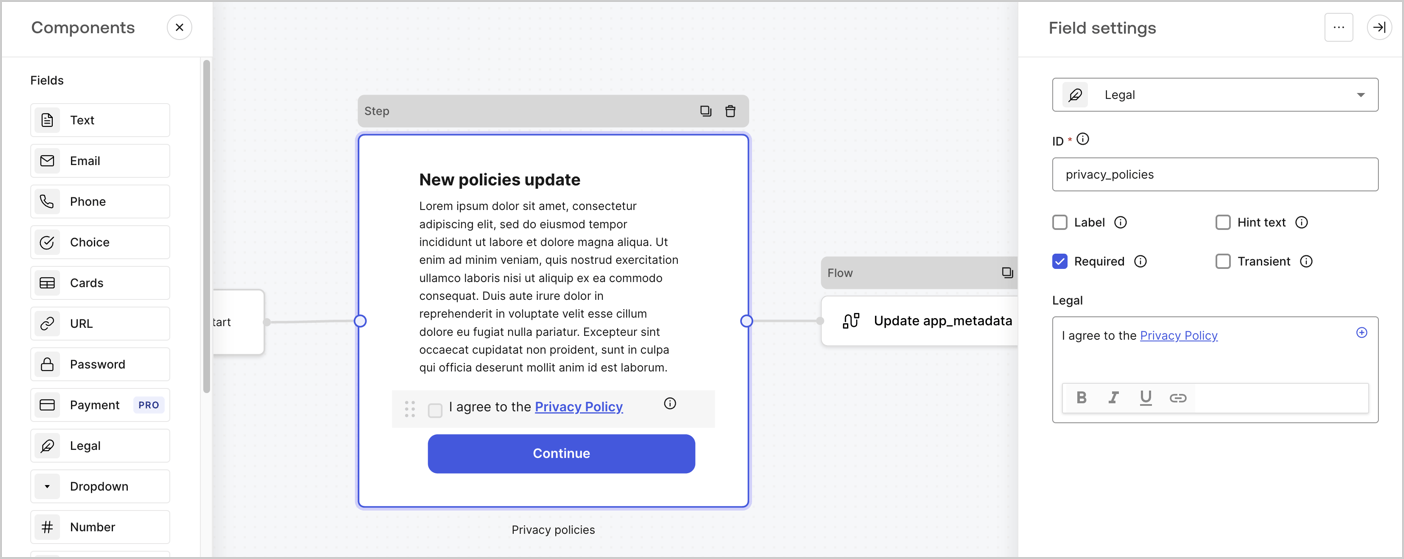
The Step node is the graphical interface visible to users. Add [Fields](/docs/customize/forms/nodes-and-components) to the Step node to collect the new agreement acceptance value by following these steps:

1. Drag a **Rich text** field from the **Components menu** into the **Step** node.

   * **Rich text**: Enter a description of your privacy policies updates.
   * Select **Save**.
2. Drag a **Legal** field into the **Step** node.

   * **ID**: Enter `privacy_policies`.
   * **Required**: Enable the checkbox.
   * **Legal**: Enter `I agree to the Privacy Policy`.
   * Select **Save**.
3. Select **Publish** to save.
<Frame>
  <img src="https://mintcdn.com/docs-staging-feat-anonymous-sessions/MP8UpSmIkvHk66e4/docs/images/cdy7uua7fh8z/59zFFjQjAnjogkc2QGIqqJ/0ad66b1b636544122aa4e65968b76c2c/privacy-policy-step-node.png?fit=max&auto=format&n=MP8UpSmIkvHk66e4&q=85&s=2e370f070b4eb5cc650e13737a203946" alt="Dashboard > Actions > Forms > Use case privacy policy step node" data-og-width="1404" width="1404" data-og-height="559" height="559" data-path="docs/images/cdy7uua7fh8z/59zFFjQjAnjogkc2QGIqqJ/0ad66b1b636544122aa4e65968b76c2c/privacy-policy-step-node.png" data-optimize="true" data-opv="3" srcset="https://mintcdn.com/docs-staging-feat-anonymous-sessions/MP8UpSmIkvHk66e4/docs/images/cdy7uua7fh8z/59zFFjQjAnjogkc2QGIqqJ/0ad66b1b636544122aa4e65968b76c2c/privacy-policy-step-node.png?w=280&fit=max&auto=format&n=MP8UpSmIkvHk66e4&q=85&s=a8fdd33d475ecc0925538f47b607a1ef 280w, https://mintcdn.com/docs-staging-feat-anonymous-sessions/MP8UpSmIkvHk66e4/docs/images/cdy7uua7fh8z/59zFFjQjAnjogkc2QGIqqJ/0ad66b1b636544122aa4e65968b76c2c/privacy-policy-step-node.png?w=560&fit=max&auto=format&n=MP8UpSmIkvHk66e4&q=85&s=4426b850b749495a50bfadfc9f788501 560w, https://mintcdn.com/docs-staging-feat-anonymous-sessions/MP8UpSmIkvHk66e4/docs/images/cdy7uua7fh8z/59zFFjQjAnjogkc2QGIqqJ/0ad66b1b636544122aa4e65968b76c2c/privacy-policy-step-node.png?w=840&fit=max&auto=format&n=MP8UpSmIkvHk66e4&q=85&s=b4287bf20da86a0fd6a884a8dea4676d 840w, https://mintcdn.com/docs-staging-feat-anonymous-sessions/MP8UpSmIkvHk66e4/docs/images/cdy7uua7fh8z/59zFFjQjAnjogkc2QGIqqJ/0ad66b1b636544122aa4e65968b76c2c/privacy-policy-step-node.png?w=1100&fit=max&auto=format&n=MP8UpSmIkvHk66e4&q=85&s=20bab6e208f31a79c43e8ae1663746b0 1100w, https://mintcdn.com/docs-staging-feat-anonymous-sessions/MP8UpSmIkvHk66e4/docs/images/cdy7uua7fh8z/59zFFjQjAnjogkc2QGIqqJ/0ad66b1b636544122aa4e65968b76c2c/privacy-policy-step-node.png?w=1650&fit=max&auto=format&n=MP8UpSmIkvHk66e4&q=85&s=69292602ee0ca1ba26013a8ee5d7f4f2 1650w, https://mintcdn.com/docs-staging-feat-anonymous-sessions/MP8UpSmIkvHk66e4/docs/images/cdy7uua7fh8z/59zFFjQjAnjogkc2QGIqqJ/0ad66b1b636544122aa4e65968b76c2c/privacy-policy-step-node.png?w=2500&fit=max&auto=format&n=MP8UpSmIkvHk66e4&q=85&s=ef72d9b2675826b89fa76a1b505c353a 2500w" />
</Frame>

### Configure the Flow node

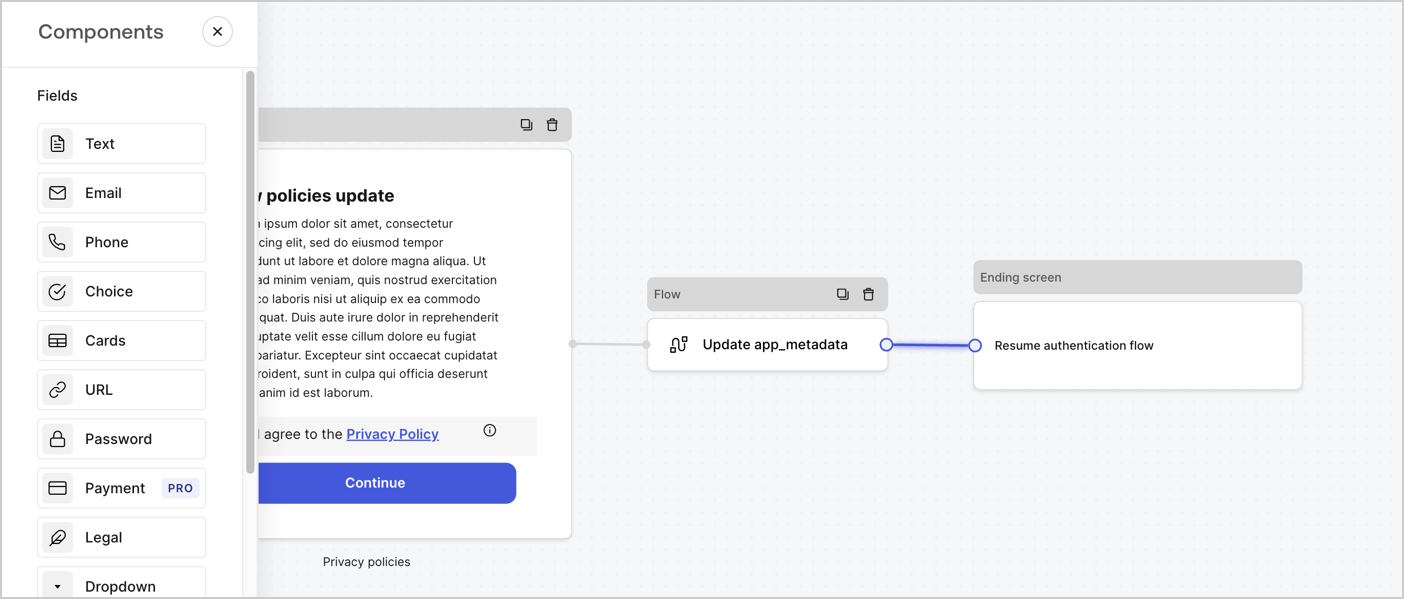
Add a **Flow** node after the **Step** node to update the `app_metadata` and resume the authentication flow by following these steps:

1. Select **Flow** from the bottom of the Form editor.
2. Remove the existing link between the **Step** and **Ending Screen** nodes.
3. Select the new **Flow** > **Click to add a flow** > **Create a new flow.**

   * Enter `Update app_metadata` in the **Name** field.
   * Select **Create**.
   * Select **Save**.
4. Link the **Flow** node to the **Step** and **Ending Screen** nodes as pictured below.
5. Select **Publish** to save.
<Frame>
  <img src="https://mintcdn.com/docs-staging-feat-anonymous-sessions/kmiy4CAOofKoyML9/docs/images/cdy7uua7fh8z/6YIkzm7SrpM9LW76AXuRzh/353c518fe82bbaa440836da1d83596d6/link-policies.png?fit=max&auto=format&n=kmiy4CAOofKoyML9&q=85&s=cafc1197c01d7a8de7677327bac010fd" alt="Dashboard > Actions > Forms > Form" data-og-width="1404" width="1404" data-og-height="599" height="599" data-path="docs/images/cdy7uua7fh8z/6YIkzm7SrpM9LW76AXuRzh/353c518fe82bbaa440836da1d83596d6/link-policies.png" data-optimize="true" data-opv="3" srcset="https://mintcdn.com/docs-staging-feat-anonymous-sessions/kmiy4CAOofKoyML9/docs/images/cdy7uua7fh8z/6YIkzm7SrpM9LW76AXuRzh/353c518fe82bbaa440836da1d83596d6/link-policies.png?w=280&fit=max&auto=format&n=kmiy4CAOofKoyML9&q=85&s=73f5e951d8c82ad30251fe617215cc87 280w, https://mintcdn.com/docs-staging-feat-anonymous-sessions/kmiy4CAOofKoyML9/docs/images/cdy7uua7fh8z/6YIkzm7SrpM9LW76AXuRzh/353c518fe82bbaa440836da1d83596d6/link-policies.png?w=560&fit=max&auto=format&n=kmiy4CAOofKoyML9&q=85&s=0f5592058d675805bb0de96a061efe56 560w, https://mintcdn.com/docs-staging-feat-anonymous-sessions/kmiy4CAOofKoyML9/docs/images/cdy7uua7fh8z/6YIkzm7SrpM9LW76AXuRzh/353c518fe82bbaa440836da1d83596d6/link-policies.png?w=840&fit=max&auto=format&n=kmiy4CAOofKoyML9&q=85&s=d7bd342854fcaa036f947437ab0e82f0 840w, https://mintcdn.com/docs-staging-feat-anonymous-sessions/kmiy4CAOofKoyML9/docs/images/cdy7uua7fh8z/6YIkzm7SrpM9LW76AXuRzh/353c518fe82bbaa440836da1d83596d6/link-policies.png?w=1100&fit=max&auto=format&n=kmiy4CAOofKoyML9&q=85&s=b319908e6b9ae4a822699207dbdb1cc7 1100w, https://mintcdn.com/docs-staging-feat-anonymous-sessions/kmiy4CAOofKoyML9/docs/images/cdy7uua7fh8z/6YIkzm7SrpM9LW76AXuRzh/353c518fe82bbaa440836da1d83596d6/link-policies.png?w=1650&fit=max&auto=format&n=kmiy4CAOofKoyML9&q=85&s=a088ebeb076a6d7b9f6784c5187a8ffc 1650w, https://mintcdn.com/docs-staging-feat-anonymous-sessions/kmiy4CAOofKoyML9/docs/images/cdy7uua7fh8z/6YIkzm7SrpM9LW76AXuRzh/353c518fe82bbaa440836da1d83596d6/link-policies.png?w=2500&fit=max&auto=format&n=kmiy4CAOofKoyML9&q=85&s=8da5f321d42b2c0324a147223506a9fd 2500w" />
</Frame>

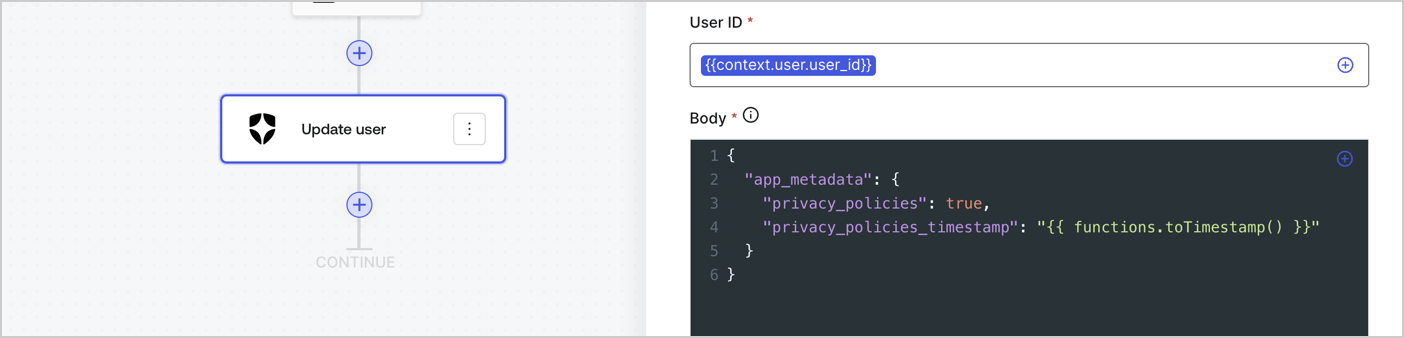
Add an Auth0 Update user action to the flow by following these steps:

1. Select the **Flow** **Update app\_metadata** > **Edit flow** to open the Flow editor in a new tab.
2. Below the StartAction, select the **+** icon to add an **Update user** action. Complete the fields below, then select **Save** to continue.

   * **Connection**: Select from the dropdown the Vault connection to your M2M application.

   * **User ID**: Enter `{{context.user.user_id}}`.

   * **Body**: Copy and paste the following code to update the app\_metadata with the privacy\_policies and privacy\_policies\_timestamp properties.

     ```text lines theme={null}
     {
       "app_metadata": {
         "privacy_policies": true,
         "privacy_policies_timestamp": "{{ functions.toTimestamp() }}"
       }
     }
     ```

   * Select **Save**.
3. Select **Publish** to save.
<Frame>
  <img src="https://mintcdn.com/docs-staging-feat-anonymous-sessions/kumNoqq6pLGY683X/docs/images/cdy7uua7fh8z/CvMNIwWrOUwaFW4X3G28p/1fb70ae57a20749d9ffaaba8dc0b7e26/update-user-privacy.png?fit=max&auto=format&n=kumNoqq6pLGY683X&q=85&s=2266826ee1e49e4f346bce22857ba034" alt="Dashboard > Actions > Forms > User case privacy policy code" data-og-width="1404" width="1404" data-og-height="338" height="338" data-path="docs/images/cdy7uua7fh8z/CvMNIwWrOUwaFW4X3G28p/1fb70ae57a20749d9ffaaba8dc0b7e26/update-user-privacy.png" data-optimize="true" data-opv="3" srcset="https://mintcdn.com/docs-staging-feat-anonymous-sessions/kumNoqq6pLGY683X/docs/images/cdy7uua7fh8z/CvMNIwWrOUwaFW4X3G28p/1fb70ae57a20749d9ffaaba8dc0b7e26/update-user-privacy.png?w=280&fit=max&auto=format&n=kumNoqq6pLGY683X&q=85&s=69fb586b9eb6ade7f99a2121ecfd67d4 280w, https://mintcdn.com/docs-staging-feat-anonymous-sessions/kumNoqq6pLGY683X/docs/images/cdy7uua7fh8z/CvMNIwWrOUwaFW4X3G28p/1fb70ae57a20749d9ffaaba8dc0b7e26/update-user-privacy.png?w=560&fit=max&auto=format&n=kumNoqq6pLGY683X&q=85&s=e5c7ca309a7104696b47f585208a505d 560w, https://mintcdn.com/docs-staging-feat-anonymous-sessions/kumNoqq6pLGY683X/docs/images/cdy7uua7fh8z/CvMNIwWrOUwaFW4X3G28p/1fb70ae57a20749d9ffaaba8dc0b7e26/update-user-privacy.png?w=840&fit=max&auto=format&n=kumNoqq6pLGY683X&q=85&s=c5233b9935d0bb9a55cff052543a5b71 840w, https://mintcdn.com/docs-staging-feat-anonymous-sessions/kumNoqq6pLGY683X/docs/images/cdy7uua7fh8z/CvMNIwWrOUwaFW4X3G28p/1fb70ae57a20749d9ffaaba8dc0b7e26/update-user-privacy.png?w=1100&fit=max&auto=format&n=kumNoqq6pLGY683X&q=85&s=ef41052bc6419a8b1cc3d4a15a8f5419 1100w, https://mintcdn.com/docs-staging-feat-anonymous-sessions/kumNoqq6pLGY683X/docs/images/cdy7uua7fh8z/CvMNIwWrOUwaFW4X3G28p/1fb70ae57a20749d9ffaaba8dc0b7e26/update-user-privacy.png?w=1650&fit=max&auto=format&n=kumNoqq6pLGY683X&q=85&s=159aff4c98cf4caddd4ffb074e3e236a 1650w, https://mintcdn.com/docs-staging-feat-anonymous-sessions/kumNoqq6pLGY683X/docs/images/cdy7uua7fh8z/CvMNIwWrOUwaFW4X3G28p/1fb70ae57a20749d9ffaaba8dc0b7e26/update-user-privacy.png?w=2500&fit=max&auto=format&n=kumNoqq6pLGY683X&q=85&s=a2c7af80c9be1b600e1939551de7b88d 2500w" />
</Frame>

<Callout icon="file-lines" color="#0EA5E9" iconType="regular">
  The flow **Update app\_metadata** adds a `privacy_policies true` value to the app`_metadata` object and also generates a timestamp with a [helper function.](/docs/customize/forms/variables)
</Callout>

## Retrieve the form render code

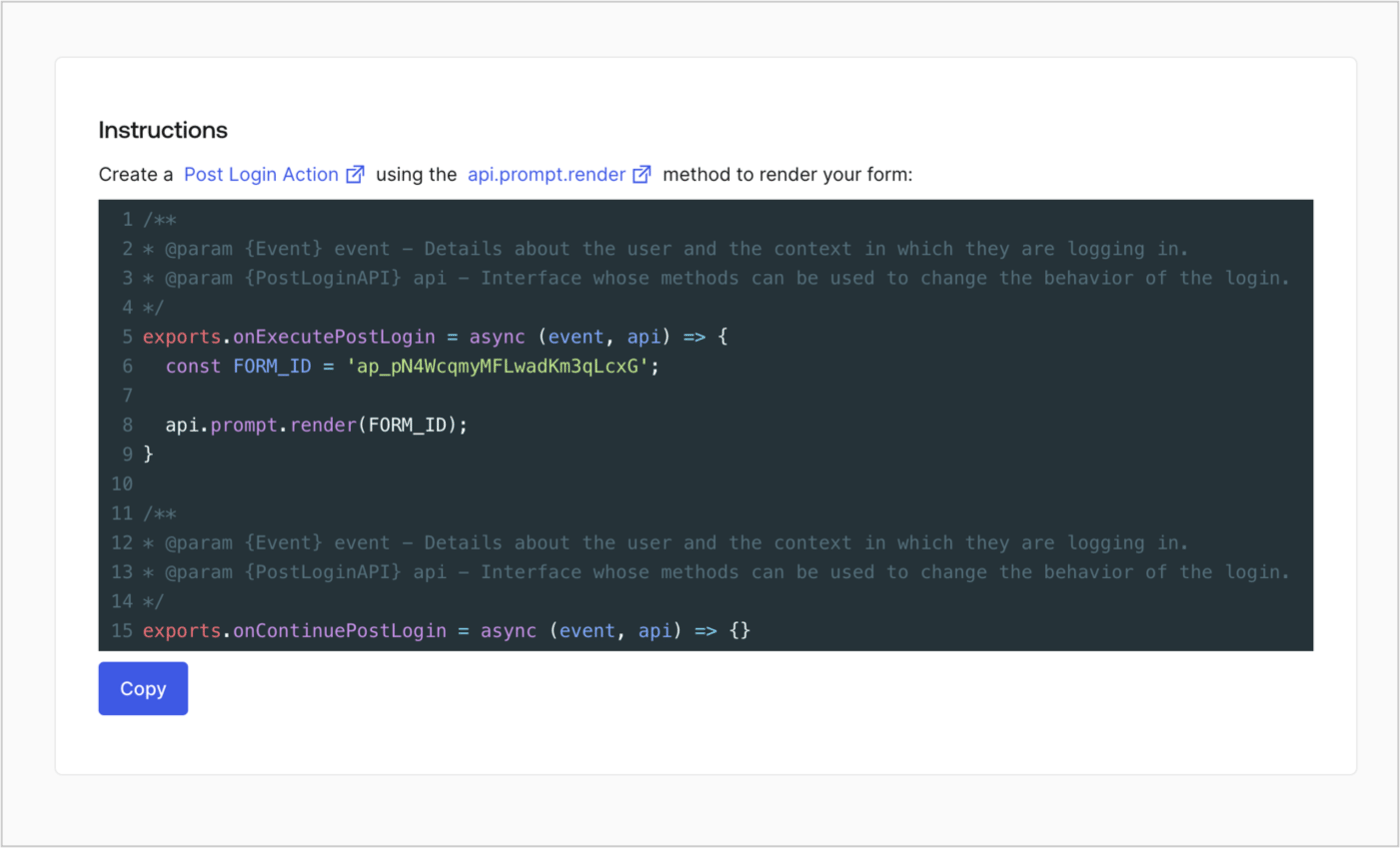
Retrieve your form render code to visually render the form with a custom Post Login Action by following these steps:

* From the Form editor, select **`<> Render`**.
* Select **Copy**.
<Frame>
  <img src="https://mintcdn.com/docs-staging-feat-anonymous-sessions/3YZHOpPU9Td5jhlM/docs/images/cdy7uua7fh8z/2EIUzc539sq9lwoTKbjoJv/496a864c0fc44a782c9cadca119dbfb0/embed.png?fit=max&auto=format&n=3YZHOpPU9Td5jhlM&q=85&s=742ae1720763cf471ce7b71963cf3c95" alt="Dashboard > Actions > Forms > Form > Embed" data-og-width="1400" width="1400" data-og-height="848" height="848" data-path="docs/images/cdy7uua7fh8z/2EIUzc539sq9lwoTKbjoJv/496a864c0fc44a782c9cadca119dbfb0/embed.png" data-optimize="true" data-opv="3" srcset="https://mintcdn.com/docs-staging-feat-anonymous-sessions/3YZHOpPU9Td5jhlM/docs/images/cdy7uua7fh8z/2EIUzc539sq9lwoTKbjoJv/496a864c0fc44a782c9cadca119dbfb0/embed.png?w=280&fit=max&auto=format&n=3YZHOpPU9Td5jhlM&q=85&s=b00a597b003540ec11e26fd566dd8342 280w, https://mintcdn.com/docs-staging-feat-anonymous-sessions/3YZHOpPU9Td5jhlM/docs/images/cdy7uua7fh8z/2EIUzc539sq9lwoTKbjoJv/496a864c0fc44a782c9cadca119dbfb0/embed.png?w=560&fit=max&auto=format&n=3YZHOpPU9Td5jhlM&q=85&s=0e5ecb83a084e96b36cb1983439b96f4 560w, https://mintcdn.com/docs-staging-feat-anonymous-sessions/3YZHOpPU9Td5jhlM/docs/images/cdy7uua7fh8z/2EIUzc539sq9lwoTKbjoJv/496a864c0fc44a782c9cadca119dbfb0/embed.png?w=840&fit=max&auto=format&n=3YZHOpPU9Td5jhlM&q=85&s=5e151b4dfef6aaebab449de3c108d725 840w, https://mintcdn.com/docs-staging-feat-anonymous-sessions/3YZHOpPU9Td5jhlM/docs/images/cdy7uua7fh8z/2EIUzc539sq9lwoTKbjoJv/496a864c0fc44a782c9cadca119dbfb0/embed.png?w=1100&fit=max&auto=format&n=3YZHOpPU9Td5jhlM&q=85&s=8190a0d45e7b8079ee0bcb932a86bcea 1100w, https://mintcdn.com/docs-staging-feat-anonymous-sessions/3YZHOpPU9Td5jhlM/docs/images/cdy7uua7fh8z/2EIUzc539sq9lwoTKbjoJv/496a864c0fc44a782c9cadca119dbfb0/embed.png?w=1650&fit=max&auto=format&n=3YZHOpPU9Td5jhlM&q=85&s=e6b59ef3f90d396134ac2ea179b5631c 1650w, https://mintcdn.com/docs-staging-feat-anonymous-sessions/3YZHOpPU9Td5jhlM/docs/images/cdy7uua7fh8z/2EIUzc539sq9lwoTKbjoJv/496a864c0fc44a782c9cadca119dbfb0/embed.png?w=2500&fit=max&auto=format&n=3YZHOpPU9Td5jhlM&q=85&s=5c936bc5863dffc98d5b964adec2d471 2500w" />
</Frame>

## Create a Post Login Action

Create a post-login Action to render your form by following these steps:

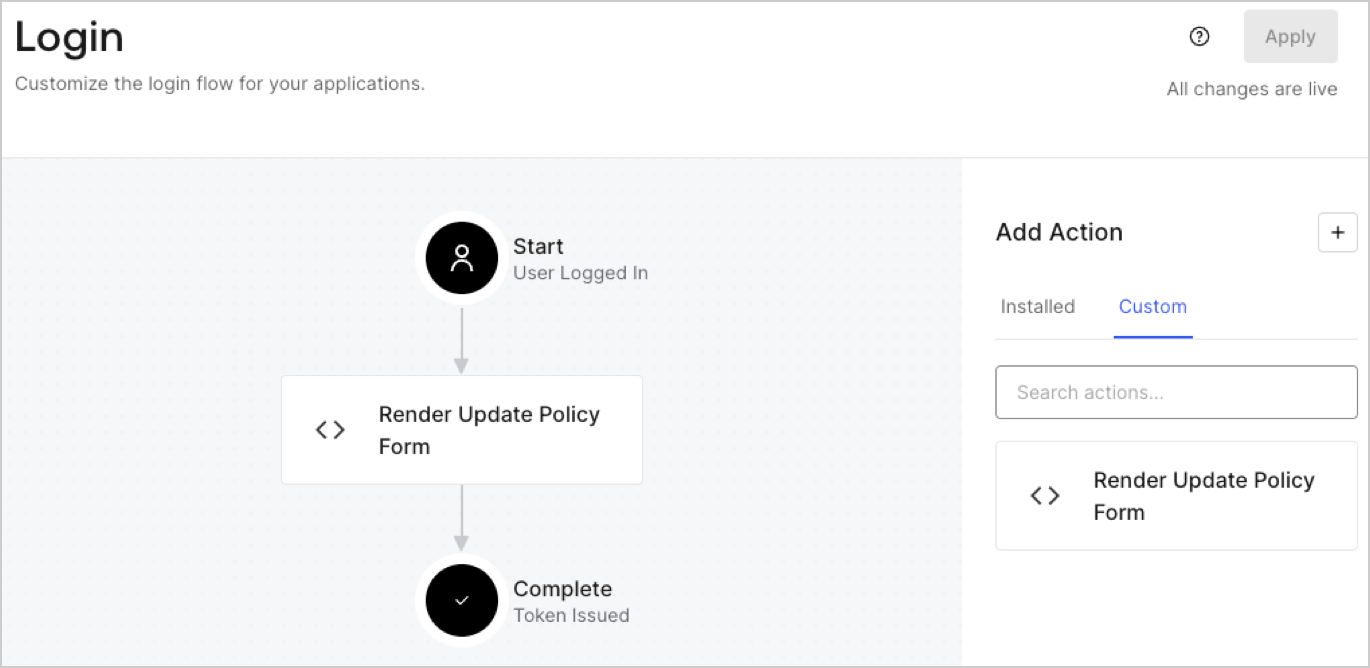
1. Navigate to **Auth0 Dashboard > Actions > Flows > Login.**
2. Select the **+** icon and Select **Build from scratch**:

   * **Name**: Enter `Render Update Policy Form`.
   * **Trigger**: Select `Login / Post Login`.
   * **Runtime**: Select the recommended version.
3. Select **Create**.

To configure the post-login Action:

1. Delete the existing code from the Code editor.
2. Paste the form render code into the Code editor.
3. Edit the code to define the conditional logic that will render the form.

   ```javascript lines theme={null}
   /**
   * @param {Event} event - Details about the user and the context in which they are logging in.
   * @param {PostLoginAPI} api - Interface whose methods can be used to change the behavior of the login.
   */
   exports.onExecutePostLogin = async (event, api) => {
     const FORM_ID = 'REPLACE_WITH_YOUR_FORM_ID';

     if (event.user.app_metadata.privacy_policies !== true) {
       api.prompt.render(FORM_ID);
     }
   }

   exports.onContinuePostLogin = async (event, api) => { }
   ```

   <Callout icon="file-lines" color="#0EA5E9" iconType="regular">
     The example code above will render the form when a user is missing the app metadata `privacy_policies` property.
   </Callout>
4. Select **Deploy.**
5. Drag and Drop the **Render Update Policy Form** Action to the **Login** flow.
   <Frame>
     <img src="https://mintcdn.com/docs-staging-feat-anonymous-sessions/7S28gdNTNLwv7krh/docs/images/cdy7uua7fh8z/5TOwDgevZsBqd7yZynUYWU/41ca909dc3007aed4f40ff794a05efa5/postlogin.png?fit=max&auto=format&n=7S28gdNTNLwv7krh&q=85&s=70d73f8f6da1d7bc4ac7acdc020df761" alt="Dashboard > Forms > Use Case > Render update policy form login action" data-og-width="1370" width="1370" data-og-height="668" height="668" data-path="docs/images/cdy7uua7fh8z/5TOwDgevZsBqd7yZynUYWU/41ca909dc3007aed4f40ff794a05efa5/postlogin.png" data-optimize="true" data-opv="3" srcset="https://mintcdn.com/docs-staging-feat-anonymous-sessions/7S28gdNTNLwv7krh/docs/images/cdy7uua7fh8z/5TOwDgevZsBqd7yZynUYWU/41ca909dc3007aed4f40ff794a05efa5/postlogin.png?w=280&fit=max&auto=format&n=7S28gdNTNLwv7krh&q=85&s=55e46503056097e40385018f37effec4 280w, https://mintcdn.com/docs-staging-feat-anonymous-sessions/7S28gdNTNLwv7krh/docs/images/cdy7uua7fh8z/5TOwDgevZsBqd7yZynUYWU/41ca909dc3007aed4f40ff794a05efa5/postlogin.png?w=560&fit=max&auto=format&n=7S28gdNTNLwv7krh&q=85&s=a041f0b983fbe02af6a71dd426880a6d 560w, https://mintcdn.com/docs-staging-feat-anonymous-sessions/7S28gdNTNLwv7krh/docs/images/cdy7uua7fh8z/5TOwDgevZsBqd7yZynUYWU/41ca909dc3007aed4f40ff794a05efa5/postlogin.png?w=840&fit=max&auto=format&n=7S28gdNTNLwv7krh&q=85&s=bf7979251b3c1e209d982dd138acbeb1 840w, https://mintcdn.com/docs-staging-feat-anonymous-sessions/7S28gdNTNLwv7krh/docs/images/cdy7uua7fh8z/5TOwDgevZsBqd7yZynUYWU/41ca909dc3007aed4f40ff794a05efa5/postlogin.png?w=1100&fit=max&auto=format&n=7S28gdNTNLwv7krh&q=85&s=6f22f35ae2da381ad5f7f19a648d94d5 1100w, https://mintcdn.com/docs-staging-feat-anonymous-sessions/7S28gdNTNLwv7krh/docs/images/cdy7uua7fh8z/5TOwDgevZsBqd7yZynUYWU/41ca909dc3007aed4f40ff794a05efa5/postlogin.png?w=1650&fit=max&auto=format&n=7S28gdNTNLwv7krh&q=85&s=c9d59efeeae0938adf9bce78cc5fa655 1650w, https://mintcdn.com/docs-staging-feat-anonymous-sessions/7S28gdNTNLwv7krh/docs/images/cdy7uua7fh8z/5TOwDgevZsBqd7yZynUYWU/41ca909dc3007aed4f40ff794a05efa5/postlogin.png?w=2500&fit=max&auto=format&n=7S28gdNTNLwv7krh&q=85&s=2873a19c8419fd720d1c074ce37f1d1c 2500w" />
   </Frame>
6. Select **Apply.**

### Test implementation

Test the implementation by following these steps:

1. Log in with an existing user whose app`_metadata` attribute `privacy_policies` does not have a value.
2. The post-login Action in the Login flow will render the form and prompt for acceptance.
3. Select **Auth0 Dashboard > User Management > Users,** locate the user and verify that the `app_metadata` attribute `privacy_policies` contains a `true` value and a timestamp.
